Scripture Feed
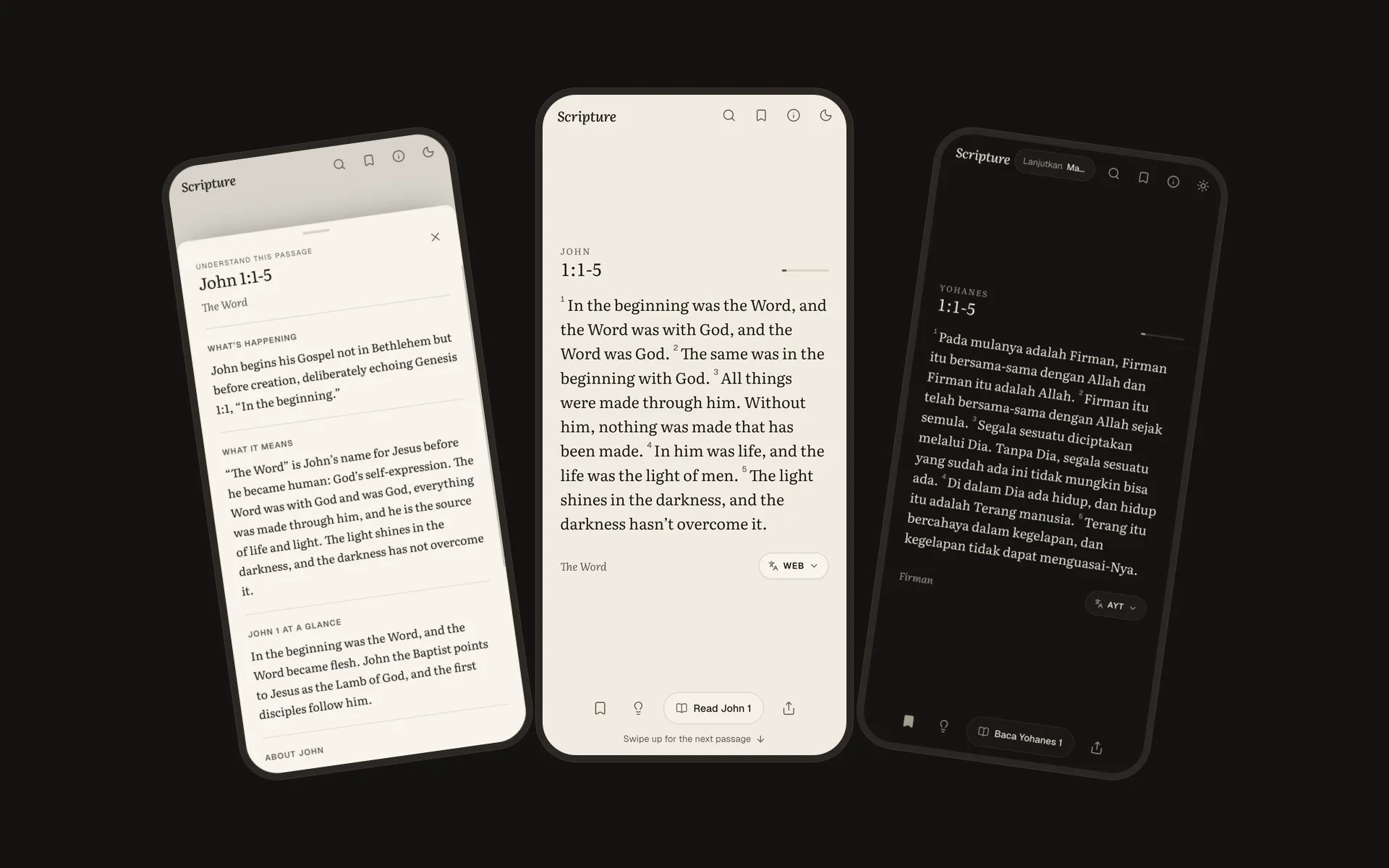
Scripture Feed is a Bible reader built on the swipe habit people already have. Open it and you are reading a passage straight away, every passage leads into its full chapter, plain-language notes explain what is going on when the text is hard to follow, and the feed ends instead of running forever.
- Next.js
- React 19
- TypeScript
- Tailwind CSS
- PWA
The Habit Was Already There
For a long time I wanted to read the Bible and rarely did. I would open it with good intentions, read a few verses, and get lost. I did not always know who was speaking, what was going on, or why a passage mattered, and without that context it was easy to close it again.
At the same time I had no trouble scrolling on my phone for an hour. The habit was already there. It just was not pointed at anything that fed me.
So I built what I needed: something as easy to open as a feed, that puts Scripture on the screen before anything else, and that helps you understand what you are reading when it does not make sense yet. There is no sign up, no likes, no followers and no notifications. The app opens straight onto a passage.
A Feed That Ends
Every feed I know is designed never to run out. This one runs out on purpose.
There is no algorithm studying the reader. The feed is 118 passages picked by hand, each chosen because it makes sense on its own, and the data file holds references only, never typed-in text. A theme on a card is only allowed to describe the verses actually shown.
Each visit shuffles them with a small seeded random generator, so the order is reproducible for a given seed and the ordering logic can be tested and replaced without touching the UI. Passages that follow on from each other in the same chapter are grouped into runs before the shuffle, so a continuation never shows up without the part before it. A second pass swaps runs around so the same book does not appear twice in a row.
Passages the reader has not finished yet always come first. "Finished" is not a scroll event: a card counts as read only after staying on screen for about 180ms per word, never less than four seconds, which is a reading pace rather than a skimming one. Nothing repeats until all 118 have been read, and the end of the feed says so when that happens.
Every ten passages the feed stops for a pause card that says "Stay with one for a while" and offers the chapters the last few passages came from. After the last passage there is an end card instead of more content. The point of the app is to get someone into a whole chapter, and a feed that never ends would work against that.
Every Passage Is a Doorway
Every card has a Read button that opens the full chapter with the passage highlighted, so a verse always leads back into its context. All 1,189 chapters are statically generated at build time.
The lightbulb on each card opens a sheet of notes written in plain language: what is happening around the passage, what it means, a short summary of the chapter, and an introduction to the book. The chapter page carries the same summary at the top and an "About the book" section.
That is 118 passage notes, 1,189 chapter summaries and 66 book introductions, in English and in Indonesian. Writing them was the largest part of the project, so a script, check:content, fails if any feed passage is missing a note or any chapter is missing a summary in either language. The notes are framed as a starting point, not the final word, and the About page says so.
One Gesture, One Card
The feed is CSS scroll snap underneath, but snap alone never quite felt right on every input, so each one is handled on its own.
On a phone, a short, clear swipe moves to the next card even when native snapping would have bounced back. Moving between cards does not use the browser's smooth scroll, which eases in slowly. A small per-frame glide starts moving at once and settles gently, with snapping switched off while it runs so the two do not fight.
A trackpad is the hard case. One flick produces a long tail of momentum events, and if every event counts, one gesture skips five cards. The feed locks after the first card move and ignores the tail. The difficulty is telling that tail apart from a real second flick. Momentum only fades and never reverses, but the browser can merge events so a single one arrives at double speed. So only a reversal, or a jump to three times the slowest recent event after the speed has faded, counts as a new gesture. A long passage that scrolls inside its own card keeps the wheel until its text is used up, and a few pixels of overflow are treated as padding, not more text.
Passage text is sized to fit. Each card picks a size tier from an estimate of its line count, and then a loop scales the type down until it stops overflowing, with a floor of 16.5px so the text never becomes too small to read comfortably.
Text I Am Allowed to Show
Bible translations are mostly copyrighted, and that shaped the architecture more than anything else.
The World English Bible, the Berean Standard Bible and the King James Version are public domain, so they are bundled as JSON and built into the site. Alkitab Yang Terbuka, the Indonesian version, is licensed for non-commercial use only, which is written into the README so it cannot be forgotten.
The NIV and NIrV come from API.Bible under a license with conditions. Their text is fetched per chapter on the server, cached for a day, and never built into the site, so a build never calls the API and the sitemap leaves those pages out. Every view is reported back through the publisher's tracking API, as the license requires, and Biblica's copyright notice appears in the reader, the version menu and the About page. When the feed pool is built from a licensed version, chapters are fetched six at a time so a cold cache does not burst past the rate limit.
Versions I cannot show at all, like the ESV, NLT, NKJV and the Indonesian TB, open the same passage on YouVersion instead.
The WEB source keeps its paragraph and poetry structure, so every other bundled version is poured into that layout verse by verse. Any verse that does not fit the structure is slotted in after its nearest neighbour. And only one file, bible-source.ts, is allowed to read Bible text at all, so the feed, the reader and search never know where the words come from.
Two Languages, Following the Version
The app is in English and Indonesian, and the language always follows the chosen Bible version. Pick the AYT and the whole interface switches to Indonesian, including book names in references. Pick an English version and it switches back. The language and the version can never disagree.
The version choice lives on the device, but server pages need to know the language too, so it is mirrored into a single cookie. That keeps the feed and every chapter page statically generated instead of rendering per request.
Search had to learn a bit of Indonesian grammar. Indonesian builds words with prefixes, and the me- and pe- prefixes swallow the first letter of the root: "kasih" becomes "mengasihi", "tolong" becomes "menolong". A plain substring search for "kasih" misses half the verses that talk about love, so for Indonesian versions each search term also matches its prefixed forms. Search also reads references typed the way people actually type them, like "jn 3 16", "Rom" or "Yohanes 3:16", and opens the chapter directly.
Screenshots
The welcome dialog, a passage in the feed, the notes sheet, the version menu, a pause card after ten passages, a chapter with the passage highlighted, search, a book page with a summary of every chapter, the same passage in Indonesian with its notes, and dark mode.
An App Without a Store
Scripture Feed is a Progressive Web App rather than a native one. A page walks people through adding it to the home screen on iPhone and Android, with a one-tap install button where the browser supports it, and once installed it opens full screen with long-press shortcuts to search, saved passages and the book list.
The service worker is network first for pages, so every deploy shows up immediately, while keeping recent pages for offline reading. Build assets are cache first.
There are no accounts. Saved passages, highlights, reading progress and the chosen version all live in the browser, behind a small storage layer with an in-memory fallback for private browsing, where storage can throw. Analytics are anonymous and cookie-free, and the About page says exactly what is counted.
Motion is a written rule in the project: anything that appears, disappears or changes state animates in and out, including dialogs, sheets, toasts and removed list items, and bottom sheets can be dragged down to close.
Tech Stack
- Next.js 16 App Router - every chapter prerendered, with licensed versions rendered on request and cached
- React 19 + Tailwind v4 - no component library; the dialogs, sheets and segmented controls are hand-built
- API.Bible - NIV and NIrV text under license, fetched on the server only
- A service worker and web manifest - installable, with offline reading
Worth being straight about: there is no test framework in this project. What it has instead are two build checks, one that fails if any note or summary is missing in either language, and one that fails if an em or en dash slips into the copy.
Looking Ahead
The whole app went from an empty Next.js project to a bilingual, installable reader with licensed translations in one week.
Two seams were left open on purpose. The feed order lives in one file and is deterministic, so it can be replaced without touching the interface, and the Bible text lives behind one file that can be pointed at an API or a database later. Those are the two places the app is built to grow.
Want to talk about this work? Email me.