Wealth OS
Wealth OS is a local-first personal finance and wealth app for macOS built around one question: given my actual financial position, what should I do with my money next? It plans the budget, checks it against what the bank says, tracks investments, and is allowed to answer "don't invest this".
- Electron
- Next.js
- TypeScript
- SQLite
- Drizzle ORM
- Zod
The Question My Spreadsheet Could Not Answer
For a long time my money lived in a spreadsheet. One sheet per payday with an expense plan, the fixed outgoings, an overall balance, and a separate saving plan that pulled prices with GOOGLEFINANCE. It was good at telling me what had happened. It had nothing to say about what to do next.
That was the question that kept coming back. A bonus lands, or a side project pays out, and there are five reasonable places for it to go. Invest it. Pay the card down. Top up the emergency fund. Put it towards a trip that is five months away. Leave it alone because rent is still due. A spreadsheet will happily do the arithmetic for any of those, but it cannot tell you which one comes first.
Neraca solved the recording side on my phone. Wealth OS is the other half: a desktop app that reads my whole position, cash, cards, savings, brokerages and fund apps, and gives a reasoned answer about the next rupiah.
No Account, No Server, No Telemetry
Financial records are the last thing I want sitting on somebody else's server, so there isn't one. Wealth OS is an Electron app with a SQLite database in ~/Library/Application Support, outside the app bundle, so updating or reinstalling the app never touches the data.
The rule I held hardest is that startup never resets anything:
- before a schema migration runs on an existing database, a full copy goes into
backups/ - a database written by a newer version of the app is refused, not migrated or overwritten
- there is one automatic backup per day while the app is open, seven kept, plus copies before every migration and every restore
- a restore checks SQLite integrity, the schema, and the version first, then saves a safety copy of the current data before replacing it
- a packaged build ignores the development database override entirely, so a release can never be pointed at a test database by accident
There is also a demo mode with its own separate database, so I can show the app to someone without opening my real records.
An Assistant That Can Say "Don't Invest This"
The core of the app is a readiness engine. It is deterministic, it works with no network, and it shows its working as a chain you can read top to bottom:
- start from the cash you can actually spend
- subtract bills and planned spending still due this period, including card balances
- keep a buffer of half a month of essential spending
- fill the emergency reserve if it is short of its target
- repay debt above 10% a year, because that is a guaranteed return no investment can reliably beat
- set aside money for goals due within the next two years
- whatever is left is the investable surplus
Expected income is shown but never counted until it is marked as received. Money you are hoping for is not money you have.
The surplus planner runs that chain on a specific amount. In the screenshots, asking where an extra Rp5.000.000 should go gets this back: repay the 21% credit card first, then top up the reserve, then set aside for a trip due in five months. The headline reads "The recommendation is not to invest this money right now. That's a deliberate outcome, not a gap." Most finance apps are built to move you towards investing. This one treats doing nothing as a valid answer, and the growth-tilted alternative is still one tab away if you disagree.
Saving a plan records the intent only. Wealth OS never moves money and never places an order.
AI Explains, It Never Calculates
There is an optional AI narrative in the daily briefing, and it is off by default. Every number the assistant mentions comes from the deterministic engine. A model may explain those results, but it never computes or overrides them, and it is instructed to introduce no figures about my finances and to treat doing nothing as a valid recommendation.
When it is switched on, it uses my own Anthropic API key, stored encrypted through macOS safeStorage, or any OpenAI-compatible model running on localhost so nothing leaves the Mac at all. The payload is built in one place and it is deliberately thin:
- summary figures rounded to two significant figures
- portfolio weights as percentages, with public tickers
- account, institution and goal names replaced with generic labels unless I allow them
- transactions, descriptions, notes, quantities and files are never sent
Before consenting, Settings shows a preview of the literal request that would go out. Turning AI off removes consent immediately.
A Difference Is Never Absorbed
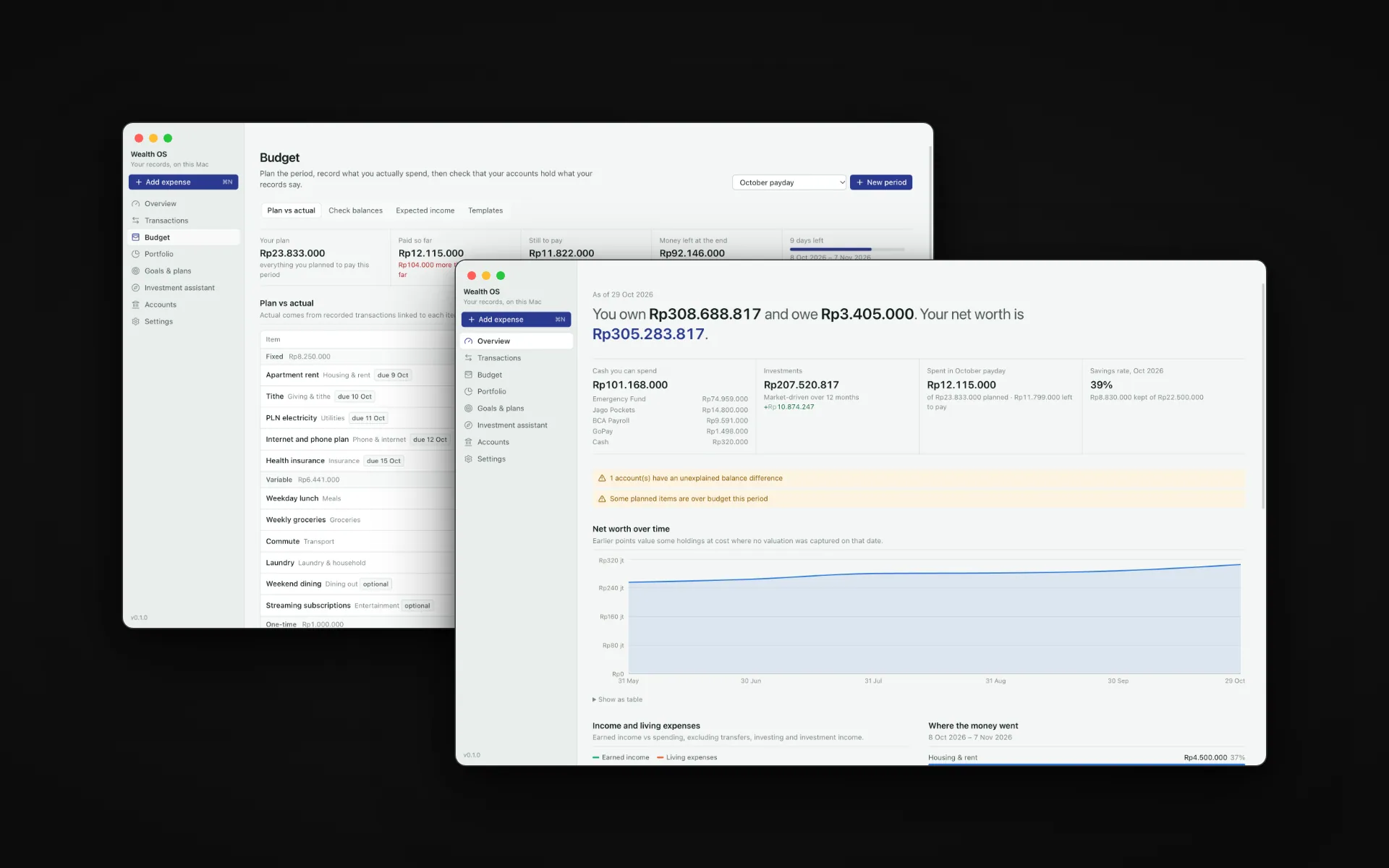
Budget periods can be any date range, because pay does not arrive on the 1st. In the screenshots the period runs from payday on the 8th to the 7th of the next month. Plan items have a unit price, a quantity and a paying account, and actual spending comes from the transactions linked to them. Weekday lunch is Rp50.000 times 22, not a lump sum, so the app can tell me how many of the 22 lunches I have used rather than just that I have spent some money on food. A coffee can count towards the money but not as another use of the lunch line.
The part I care about most is Check balances. You type what each bank app actually shows, and Wealth OS compares it with what your records say. If GoPay shows Rp37.000 less than expected, that difference is reported as open. It is never quietly absorbed into the balance. You investigate it, then either explain it or record a visible adjustment, and every check is kept in the history as it was.
Underneath, it is the same idea as Neraca: a double-entry ledger where balances are always derived from postings and never stored, so a transfer, a card payment or a brokerage deposit can never be miscounted as spending.
Returns Net of What I Put In
My old spreadsheet had an Increase column and a Percentage column, and both were wrong in the same way: they counted every deposit as a gain. Put Rp3.000.000 into a brokerage and it looked like a great month.
Wealth OS separates what you added from what the market did. Performance is reported as a time-weighted return, linked from Modified Dietz periods, alongside a money-weighted XIRR, and both have known-answer tests. The overview chart draws investment value against starting value plus net contributions, so the gap between the lines is the market and nothing else.
Prices are treated with the same suspicion:
- every price shows its source and time, and is labelled current, delayed, stale, unavailable or manual
- a manual price is never overwritten by a fetched one
- a quote that comes back in the wrong currency for its instrument is rejected as a likely wrong symbol
- a holding with no price is valued at cost and flagged rather than silently dropped
- providers receive symbols and currency codes only, never balances or quantities
IDX stocks, US ETFs and crypto can be priced automatically with your own provider key. Reksa dana, deposits and bonds have no reliable free source, so they are honest manual values or a fund app valued by the total you record, which is how the Bibit account works in the screenshots. Exchange rates come from the European Central Bank reference rates or a manual rate, so the USD brokerage is valued in rupiah alongside everything else.
Bringing the Spreadsheet Along
Nobody switches to a new finance app if it means retyping years of history, so the importer reads my old workbook directly, and it trusts it as little as possible.
It recognises the budget and saving sheets by their labels, not by fixed cells. Plan totals are recomputed from price times quantity, and the spreadsheet's cached results are only compared, never trusted. Spelling variants of the same bank are proposed as one account so they are not counted twice. Cached #DIV/0! and GOOGLEFINANCE values are reported rather than imported, and when a sheet's dates disagree with its name, because it was copied without updating them, the name's dates are proposed instead.
Everything is reviewed before it is saved, and the import runs in a single transaction. Either everything I approved goes in, or nothing does. Re-importing the same file skips what already exists.
Screenshots
The overview, its charts and balance checks, transactions, the budget plan against actuals, checking balances against the bank, portfolio holdings across IDR and USD, goals with scenario projections, the monthly income plan, the readiness chain, the surplus planner deciding not to invest, and accounts. Every name and figure here is invented sample data entered through the app, not my own finances.
A Desktop App With the Doors Locked
Electron makes it very easy to ship a web page with full access to the machine, which is exactly the wrong default for an app full of financial records.
The interface is a Next.js static export served from a custom app:// protocol under a strict Content Security Policy. It has no Node access, no network access beyond its own origin, and no direct database access. The preload exposes a single function, invoke(channel, payload), and the main process only accepts calls from the app origin, only for channels on an explicit list, and validates every payload with a zod schema before any service runs. The renderer uses those same schemas for its forms, so the validation the user sees and the validation that protects the database cannot drift apart.
All external requests live in the main process. Navigation away from the app and new windows are blocked, and external links open in the browser. console is banned by the lint config, and the log records event names and stack frames only, never financial data.
Testing
There are 117 unit and integration tests across 14 files, all on synthetic data, with TZ pinned to Asia/Jakarta so month-boundary bugs show up in tests instead of at midnight on the 31st. They cover the ledger invariants, budget and reconciliation, valuation and FX, realized and unrealized gains, known answers for XIRR, TWR and Modified Dietz, readiness and allocation, import parsing, market-data refresh including offline and manual-price protection, backups, migrations, and the privacy of the AI payload.
On top of that, Playwright drives the packaged app, not a dev server, each test in a throwaway data folder: recording, reconciling, restarting and checking that everything persisted, working with no network, keeping demo data isolated, and the guard that stops a release from opening a development database.
The calculation layer in src/lib is pure, with no database, Node, Electron or React, and ESLint enforces that boundary.
Tech Stack
- Electron - the desktop shell, secure IPC, macOS safeStorage for keys, and the background price refresh and backups
- Next.js static export + React 19 - the interface, served from
app://with no server behind it - SQLite (better-sqlite3) + Drizzle ORM - one local database file with forward-only generated migrations
- Zod - one set of schemas shared by the forms and the IPC boundary
- decimal.js - quantities, prices and rates as decimal strings, money as integer minor units
- Recharts, Radix and Tailwind CSS - charts and the interface
- Vitest and Playwright - unit tests and end-to-end tests against the packaged app
Looking Ahead
Wealth OS currently runs on Apple-silicon Macs only, and the build is unsigned, so the first launch has to get past Gatekeeper. Signing and notarization are the obvious next step before anyone else installs it.
The honest limitations are written into the README rather than hidden. There are no bank or broker balance APIs, so those balances come from my own entries. Prices only refresh while the app is open, and performance history builds up from the days it was opened, which is why a fresh install shows holdings at cost before it has any history.
What I would not change is the order of things: the arithmetic is deterministic and testable, the AI only ever explains it, and the app is allowed to tell me to leave the money where it is.
Want to talk about this work? Email me.